One Flake to Hack Them All
Note
Sep 14, 2026
· ~16 min readI recently played Cyber Showdown CTF on a pure Nix setup, and it convinced me that Nix is one of the best things to happen to my CTF workflow. It also broke a few binaries in ways that taught me more about how Linux actually loads a program than any blog post ever did.
So this is two things at once. It is a practical guide to running a CTF lab on Nix: how to set it up, the everyday commands, and the advanced moves most people never find. And it is an honest field report of the friction, with real terminal output as proof, because a guide that only shows the happy path is lying to you.
If you have never touched Nix, do not worry. I will explain the mental model before the machinery, and every command has a reason attached.
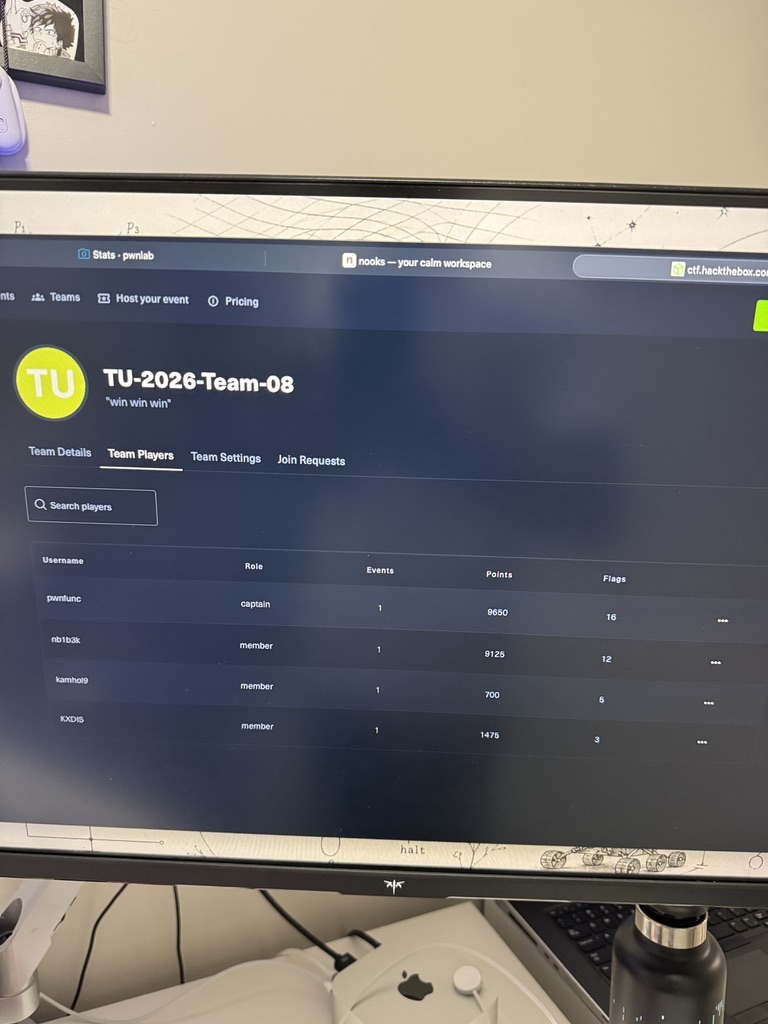
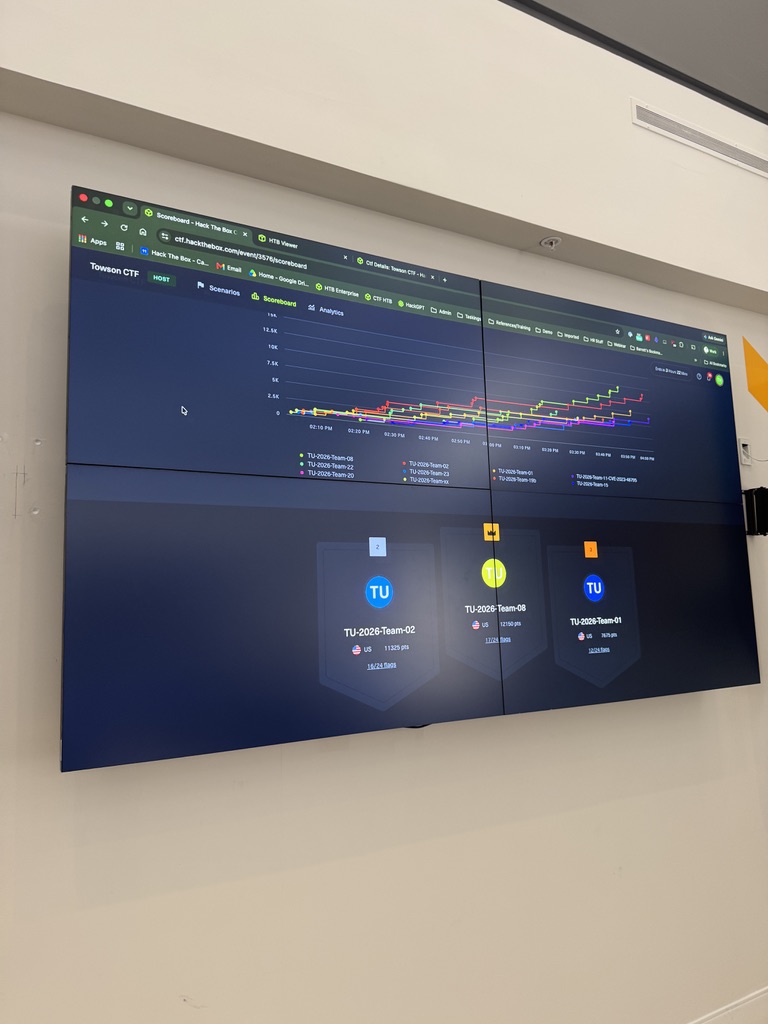
Before any of the technical detail: my team, TU-2026-Team-08 (team motto, “win win win”), finished first, closing out the event with 20,951 points. Every flag came out of the Nix shell this post is about, so take the rest as proof the setup holds up under real competition pressure and not just on a quiet afternoon.
Why bother? The problem Nix actually solves
Every CTF player knows the ritual. A challenge drops, you clone an exploit, and then:
$ python3 solve.py
ModuleNotFoundError: No module named 'pwn'
$ radare2 chall
zsh: command not found: radare2
$ sudo apt install volatility3
E: Unable to locate package volatility3
Twenty minutes gone before you have looked at a single byte. Worse, your machine slowly becomes a landfill: three Python versions, a dozen Go recon tools on your PATH forever, a pip environment held together with hope. Six months later you reopen an old writeup and the commands no longer reproduce because a tool silently updated under you.
There are three distinct problems hiding in there:
- Pollution. You do not want
sqlmap,masscan, and forty recon binaries living on your host permanently. You want them while you work and gone afterward. - Irreproducibility. “Works on my machine” is a curse. Tool versions drift, and your old solve scripts rot.
- Non-portability. My Linux tower and my MacBook were never set up the same way, so half my muscle memory broke when I switched.
Nix fixes all three at once, and it does so with a single idea.
The one idea behind Nix
Here is the whole mental model, and it is worth internalizing before you copy any config.
Core idea. In Nix, every package is built from a pure description of its inputs and lands in a read-only store path like
/nix/store/abc123...-radare2-5.9.0. Nothing installs into/usr/bin. A “shell” or an “environment” is just a set of these store paths stitched onto yourPATHtemporarily.
Three consequences fall straight out of that, and they map exactly onto the three problems above:
- Because packages live in the store and not on your host, an environment is isolated and disposable. It exists while you are in it.
- Because a package is a pure function of its inputs, and those inputs are pinned in a lock file, the environment is reproducible. Same inputs, same bytes, next year, on any machine.
- Because that same description evaluates per system, one file gives you the same tools on Linux and macOS, x86 and ARM.
That is the entire pitch. Everything below is mechanics.
The setup: one flake, one devshell
A flake is a file, flake.nix, that declares inputs (where packages come from) and outputs (what you want built). For CTF, the output you care about is a devShell: an environment you drop into that has your tools on PATH.
Here is the skeleton I actually use. The one non-obvious trick is forAllSystems, which builds the same shell for every platform so I never maintain a separate Mac config:
{
  description = "Reproducible CTF / bug-hunting lab";

  inputs.nixpkgs.url = "github:nixos/nixpkgs/nixos-unstable";

  outputs = { nixpkgs, ... }:
    let
      systems = [ "x86_64-linux" "aarch64-linux" "x86_64-darwin" "aarch64-darwin" ];
      forAllSystems = f: nixpkgs.lib.genAttrs systems (system:
        f (import nixpkgs {
          inherit system;
          config.allowUnfree = true;   # opt into unfree tools once (Burp, etc.)
        }));
    in {
      devShells = forAllSystems (pkgs: {
        default = pkgs.mkShell {
          packages = with pkgs; [
            # the whole arsenal goes here
          ];
        };
      });
    };
}
Two small decisions in there pay off constantly:
config.allowUnfree = trueset once at theimportsite. Some tools carry unfree licenses, and this saves you from fighting that wall mid event.- The four-entry
systemslist. Havingaarch64-darwinin there is why the exact same shell works on Apple Silicon with zero extra effort.
Now the part that matters more than people admit: group the package list by phase, not alphabetically. When you are mid challenge with adrenaline up, a flat sorted list is useless. A grouped one is a map:
packages = with pkgs; [
  # recon
  subfinder amass assetfinder dnsx httpx katana gau waybackurls gowitness
  # web / fuzzing
  ffuf gobuster feroxbuster dalfox arjun sqlmap
  # network / scanning
  nmap naabu masscan
  # reversing / binary
  file binutils gdb ltrace strace radare2 binwalk upx patchelf gcc qemu
  # forensics
  tshark sqlite
  # source & secret analysis
  semgrep gitleaks trufflehog ripgrep fd jq yq
  # runtimes / glue
  python3 nodejs bun esbuild uv
  unzip zstd age
];
There is a quiet bonus here. When you reopen this repo in a year, the flake documents how you approach a target. The categories are your methodology, written down.
direnv: making it effortless
A flake is nice, but typing nix develop every time you cd is friction, and friction is what kills good habits. Kill it with direnv.
One file, .envrc, with one line:
use flake
The first time you enter the folder, direnv asks permission once:
$ direnv allow
From then on, the shell activates automatically when you enter the directory and deactivates when you leave. Your tools appear on cd in and vanish on cd out. The environment becomes invisible, which is exactly what you want.
Speed tip. Pair it with
nix-direnv, which caches the evaluated environment so re-entering a folder is instant instead of re-evaluating the flake each time. On a big toolset this is the difference between “instant” and “annoying.”
The Python escape hatch: uv
Here is a hard-won rule: do not try to package fast-moving Python security tools as Nix derivations mid competition. pwntools plugins, Volatility 3, one-off PoCs with weird pinned deps: packaging those the Nix way is more effort than the challenge itself.
The clean split is: Nix for system tools, uv for the Python churn. So uv goes in the flake, and it manages throwaway Python environments that are as disposable as the shell around them.
# run Volatility 3 without installing anything permanent
$ uvx --from volatility3 vol -f memory.raw windows.info

# or a scratch venv for one challenge
$ uv venv && uv pip install pwntools requests
uv is extremely fast and its environments live in the challenge folder, so they disappear when you are done. You get a reproducible base with a flexible top layer. This is literally how I ran Volatility on a memory forensics box during the event without leaving a trace on the host.
Where it got interesting: running foreign binaries
Everything above is the happy path. Now the friction, because this is the part that actually teaches you something.
CTF binaries are, by definition, foreign binaries. And a clean, isolated Nix environment is precisely what makes foreign binaries hard to run. That is not a bug. It is the isolation doing its job. But you need to know the moves.
Gotcha 1: the binary that “does not exist”
First pwn challenge of the event, a textbook ret2win. I built the exploit, went to test locally, and hit this:
$ ./rpz_gate_1
zsh: no such file or directory: ./rpz_gate_1
The file is right there. ls shows it. So what is missing? Ask file:
$ file rpz_gate_1
rpz_gate_1: ELF 64-bit LSB executable, x86-64, dynamically linked,
  interpreter ./glibc/ld-linux-x86-64.so.2, not stripped
There is the answer, in the word interpreter. When you run a dynamically linked ELF, the kernel does not run your binary first. It runs the dynamic loader named in the ELF’s interpreter field, and that loader maps your binary and its libraries into memory. The “no such file or directory” error was never about rpz_gate_1. It was about the loader path not existing.
On a normal distro the interpreter is /lib64/ld-linux-x86-64.so.2 and it is always present. On Nix there is no /lib64 at all, because nothing installs to those global paths. This particular challenge was even sneakier: it shipped its own loader at a relative path, ./glibc/ld-linux-x86-64.so.2, so it only resolves if your working directory is the challenge directory.
Three fixes, easiest first. Learn all three because each wins in a different situation.
Fix 1, just cd in. Works when the binary uses a relative loader like this one:
$ cd gate1/        # so ./glibc/ld-linux... resolves relative to here
$ python3 solve/exp.py
You won the race!
Here is your key: HTB{f4k3_fl4g_4_t35t1ng}
Fix 2, patch the interpreter. This is why patchelf is in my flake. You rewrite the binary’s interpreter field to point at a loader that actually exists in the Nix store:
# point it at glibc's loader from the store
$ patchelf --set-interpreter \
    "$(nix eval --raw nixpkgs#glibc)/lib/ld-linux-x86-64.so.2" ./somebin
Use this when you need the binary to run from anywhere, not just its own folder.
Fix 3, nix-ld. The set-and-forget option for NixOS. It installs a small stub at the standard /lib64/ld-linux-x86-64.so.2 path that redirects to libraries you declare in your config. Enable it once and most dynamically linked binaries simply run. If you play CTFs regularly on NixOS, this is worth doing. On non-NixOS, the quick equivalent is steam-run ./bin, which drops the binary into an FHS sandbox where the traditional paths exist.
When to reach for which.
cdwhen the binary ships its own loader.patchelfwhen it must run anywhere.nix-ldorsteam-runwhen you never want to think about this class of problem again.
And the quieter Nix lesson from this challenge: pwntools was not something I wanted to negotiate with nixpkgs about mid event, so it is not in the flake. uv is, and uv pip install pwntools in the challenge folder solved it in seconds. The rule from earlier, proven under fire.
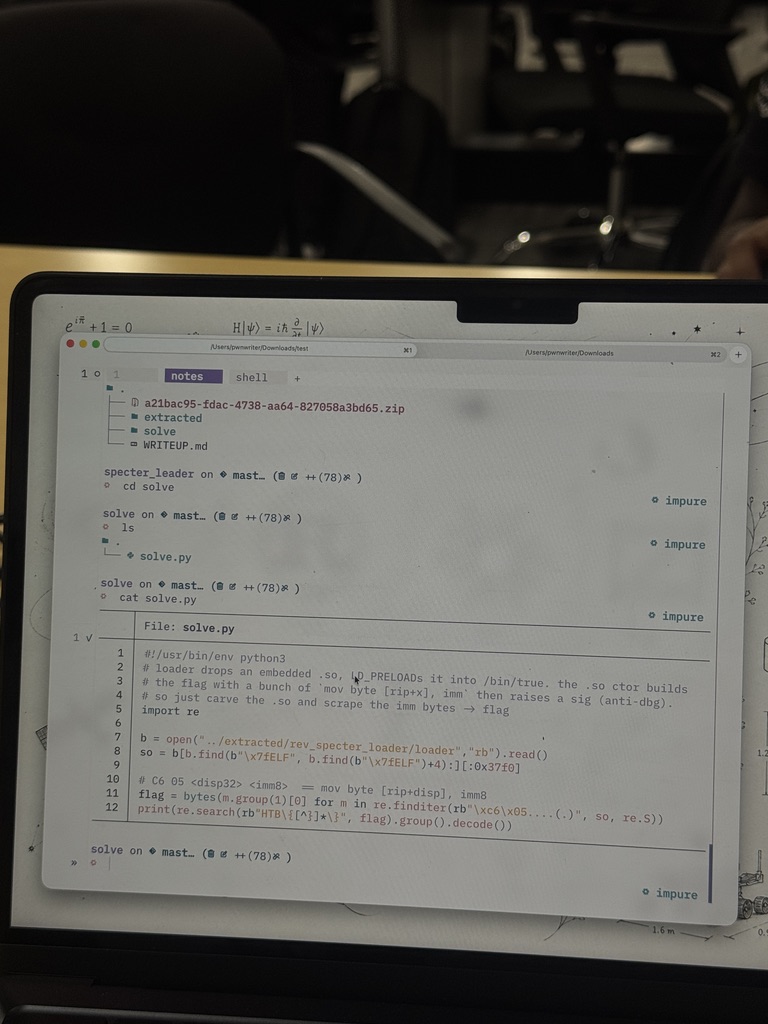
Here is what a solve actually looked like from inside that shell. This reversing challenge shipped a loader that dropped an embedded .so and LD_PRELOADed it into /bin/true, and the .so constructor built the flag with a run of mov byte [rip+x], imm before raising a signal to trip up debuggers. No need to run it: just carve the .so out and scrape the immediate bytes. Editor, notes, and shell, all one direnv allow away.
Gotcha 2: the toolchain that only speaks x86
Later there was a reversing challenge whose binary was ARM64 while I was on x86:
$ file ghost
ghost: ELF 64-bit LSB pie executable, ARM aarch64, dynamically linked, not stripped
Two separate Nix papercuts, back to back.
Papercut A: objdump is single-target. My reflex is objdump -d. But the binutils in your shell is built for your target, so it refuses a different architecture:
$ objdump -d ghost
objdump: can't disassemble for architecture UNKNOWN!
You could pull a cross-binutils into the flake with pkgsCross.aarch64-multiplatform.binutils, but that is a yak-shave in the middle of a competition. The pragmatic move: radare2 is multi-architecture out of the box. It was already in the flake and read the ARM64 without complaint:
$ r2 -A ghost
[0x00000abc]> pdf @ main    # disassembles aarch64, no cross toolchain needed
Rule of thumb. On a Nix devshell, treat
objdumpandgdbas single-target. For anything cross-architecture, default toradare2or Ghidra and skip the cross-compilation rabbit hole entirely.
Papercut B: running it needs a sysroot. The challenge gimmick was that the flag gets assembled in memory and written to /dev/null, so running it shows nothing. Three bytes of the flag came from syscall return values, so I actually wanted to run it under emulation and watch. qemu is in the flake:
$ qemu-aarch64 ghost
qemu-aarch64: Could not open '/lib/ld-linux-aarch64.so.1': No such file or directory
Same loader problem as before, now cross-architecture. QEMU needs to find the aarch64 glibc, which lives deep in the Nix store. You hand it the location with -L, and here is the single most useful trick in this whole post for locating it:
$ SYSROOT=$(nix eval --raw nixpkgs#pkgsCross.aarch64-multiplatform.glibc)
$ QEMU_STRACE=1 qemu-aarch64 -L "$SYSROOT" ghost 2>&1 \
    | grep -E 'close|open|read|write'
That nix eval --raw nixpkgs#<package> pattern prints the store path of any package as a plain string, so you can feed it to a tool that knows nothing about Nix. Loaders, sysroots, library headers, whatever a dumb tool needs, Nix already has it built. You just have to point the tool at the path.
And then strace lied to me. I tried to watch the syscalls the normal way, and it went blind the instant the program ran. The reason is genuinely funny: the program calls close(2), which closes standard error, and standard error is exactly where strace writes its own output. By closing its fd, the program silenced its own tracer.
The fix was refreshingly low tech. The kernel returns the same values on any architecture, so I reproduced the same close, open, read, write sequence in a tiny C program and compiled it with the flake’s gcc:
$ gcc -o repro solve/repro.c && ./repro
0 0 -1
Those three values decoded to the three mystery bytes and gave up the flag. The recurring lesson across both challenges: when the fancy dynamic tool fights the environment, a static or offline reproduction usually wins. Reading the loader field beat guessing. A C repro beat strace. Boring is fast.
Advanced moves worth knowing
These are the things that took me from “surviving on Nix” to “faster because of Nix.”
Grab a tool for one challenge without touching your flake
You do not have to edit flake.nix every time you want something once. Two commands cover it:
# drop a tool onto PATH for this shell only
$ nix shell nixpkgs#ghidra

# or run it once and throw it away
$ nix run nixpkgs#ghidra
Neither installs anything permanently. This is perfect for a heavy tool like Ghidra that you want for exactly one reversing challenge and never again.
Keep separate shells for separate jobs
A quick web box should not have to load QEMU and GDB. Expose more than one devShell and pick per task:
devShells = forAllSystems (pkgs: {
  default = pkgs.mkShell { /* everything */ };
  recon   = pkgs.mkShell { packages = with pkgs; [ subfinder httpx ffuf ]; };
  re      = pkgs.mkShell { packages = with pkgs; [ radare2 gdb qemu patchelf ]; };
});
$ nix develop .#recon # only the recon tools, loads faster
Pin the world so your writeup reproduces forever
This is the payoff that other approaches cannot match. Your flake has a companion flake.lock that records the exact revision of nixpkgs you used, which pins every tool version transitively.
Commit flake.lock next to your writeup. Then the commands in that writeup are reproducible byte for byte, years later, on hardware you do not own yet. When you want fresh tools, you update deliberately:
$ nix flake update # bump the lock on your schedule, not the CTF's
Do this when you choose, not the night before a competition. Pinned means pinned.
When a tool truly hates Nix, give it an FHS jail
Some tools assume a traditional Linux filesystem: pip wheels with precompiled native extensions, certain commercial binaries, the odd installer that hardcodes /usr/lib. Rather than patch each one, build a fake standard-filesystem sandbox with buildFHSEnv:
# an FHS shell where /usr, /lib, /lib64 exist like a normal distro
(pkgs.buildFHSEnv {
  name = "ctf-fhs";
  targetPkgs = p: with p; [ python3 gcc glibc zlib ];
}).env
Enter that and stubborn binaries behave as if they are on Ubuntu, while your host stays clean. This is the escape hatch of last resort, and it is good to know it exists before you need it at 2 a.m.
Share one flake with your whole team
For team events this is quietly a superpower. Commit the flake to your team repo, and every teammate who runs nix develop gets the identical toolset at identical versions. No more “it works for me but not for you.” The environment stops being a variable in your debugging.
The cheat sheet I wish I had started with
Everything above, compressed into the table I now keep in a browser tab:
| Symptom | Real cause | Fix |
|---|---|---|
./bin: no such file or directory, but the file exists | ELF interpreter path missing on Nix | patchelf --set-interpreter ..., cd to a shipped loader, or nix-ld |
qemu-...: Could not open '/lib/ld-...' | Cross-arch loader not found | qemu-<arch> -L "$(nix eval --raw nixpkgs#pkgsCross.<arch>.glibc)" ./bin |
objdump: can't disassemble for architecture UNKNOWN! | nix binutils is single-target | use radare2 or Ghidra (multi-arch) |
pip install fights nixpkgs | fast-moving Python packaging | keep uv in the flake, uv pip install ... |
strace goes blind after close(2) | the program closed strace’s own fd | reproduce the syscalls in a tiny C program |
| Need a tool once | do not want to edit the flake | nix shell nixpkgs#tool or nix run nixpkgs#tool |
| A binary assumes a normal filesystem | it hardcodes /usr, /lib64 | wrap it in buildFHSEnv or run steam-run |
| Locate glibc, a loader, a sysroot | Nix stores it in /nix/store | nix eval --raw nixpkgs#<pkg> prints the path |
Would I run a CTF on Nix again?
Without hesitation, yes. The detours in this post are a one-time tax you pay while the reflexes wire in: run file first, patch or point the loader, reach for radare2 on anything cross-arch, use uv for Python, and drop to a static reproduction when a live tool fights you. Once those are habits, the payoff is large and permanent.
Every challenge folder becomes reproducible, disposable, and identical across my Linux box and my Mac. My gate1 exploit will still run byte for byte next year because flake.lock pins the entire world it needs. Nothing lands on my host, and the whole toolbox closes behind me when I cd out.
The tools being missing by default felt like friction in the moment. By the end of Cyber Showdown it felt like the entire point.
If you are starting out, you do not need to “learn Nix” first. Copy a flake.nix, add an .envrc with use flake, run direnv allow, and keep this cheat sheet open. That gets you ninety percent of the value on day one. The rabbit hole is deep, but the entrance is a two-line file, and now you know exactly what bites.
And, for the record, we took first. Here is the final team board and the sticker haul to prove we showed up.